Skip to content
  • There are no suggestions because the search field is empty.

How to Adjust Staff User Notification Settings

Staff users can customize their notification preferences to control which alerts they receive within the platform.


🧭 Step 1: Log In to Staff Account

Log in using your Staff user credentials.


👤 Step 2: Open Profile Settings

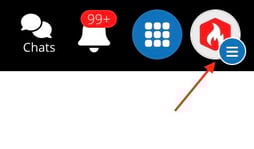
  • Click the Profile Icon

Screenshot 2026-04-21 at 11.39.49 AM

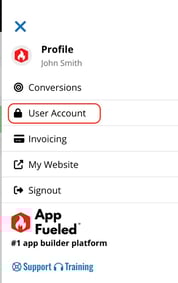
  • Select User Account

Screenshot 2026-04-21 at 11.40.19 AM


⚙️ Step 3: Adjust Alert Settings

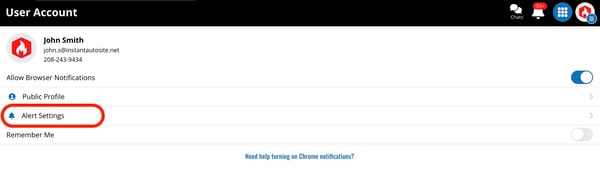
  • Select Alert Settings

Screenshot 2026-04-21 at 11.40.34 AM

  • Check or uncheck the notification options based on your preferences


💾 Step 4: Save Changes

Ensure your preferences are saved before exiting.


✅ Result

Your notification settings are now updated, and you will only receive alerts based on your selected preferences.