---
title: Boosting Appointments with Slow-Day Drip Template
description: Learn how to set up a Slow-Day Drip or Trigger Automation in your AppFueled Admin Panel. This guide explains how to schedule messages, set filters, and customize text campaigns to increase appointments on slower business days.
---
[Skip to content](https://appfueled.com/help/boosting-appointments-with-slow-day-drip-template-#main-content)
[More support](https://appfueled.com/help/kb-tickets/new?hsLang=en-us)

Open main navigation
Close main navigation
- [More support](https://appfueled.com/help/kb-tickets/new)
- [Submit Ticket](https://appfueled.com/support)
[Submit Ticket](https://appfueled.com/support?hsLang=en-us)
How can we help you?
- There are no suggestions because the search field is empty.
1. [Help Center](https://appfueled.com/help?hsLang=en-us)
2. [Templates/Automated Texts & Emails](https://appfueled.com/help/templates-automated-texts-emails?hsLang=en-us)
3. [Slow Day](https://appfueled.com/help/templates-automated-texts-emails?hsLang=en-us#slow-day)
# Boosting Appointments with Slow-Day Drip Template
## Slow Day Drip Template
#### ***Watch this 👀\*\*step-by-step guide\*\****
#### **⚙️ Step 1: Log In to the Admin Panel**
Go to [InstantAutoSite Admin Panel](https://www.instantautosite.net/login).
Enter your credentials to access your account dashboard
---
#### **🧩 Step 2: Locate the Slow Day Trigger Template**
Once logged in, click **Marketing → Templates.**
**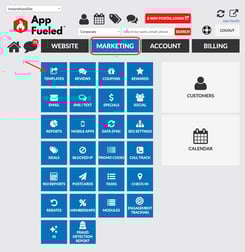**
Click on **Customers** **→** scroll down until you find **Slow Day Trigger.**
This is the automation tool used to send marketing messages on slower business days to help **increase appointments and shop traffic.**
---
#### **🗓️ Step 3: Set Your Send Schedule**
Choose when and how often you want your **Slow Day Trigger** message to send.
You can select from the following scheduling options:
- **One-Time Send:** Send the message once on a specific date.
- **Monthly Recurrence:** Send on the same day each month (e.g., the 1st of every month for 6 months).
- **Weekly Recurrence:** Send on a chosen weekday (e.g., every Monday for the next 3 weeks).
- **Daily Recurrence:** Send each day for a defined period.
Once you’ve chosen your schedule:
- Toggle the template **ON**.
- Click **Update** to save your schedule settings.
---
#### **🎯 Step 4: Set Filter Preferences**
Scroll down to the **Filter Settings** section.
These filters help you target the right customers while staying compliant.
Recommended filter settings:
- **Customer Type:** All
- **Customer Type(Your SMS System)**: Personal
- **Marketing Permissions:** ON
- **Customer’s Last Visit:** Within the last **24 months**
- **Customer Status:** Active
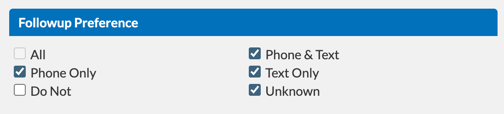
- **Follow-Up Preferences:**
- Phone and Text
- Text Only
- Unknown
- Phone Only
- **Upcoming Appointment:** Set to **No** (prevents messages to customers who already have an appointment).
- **Visit in Progress:** Set to **No** (avoids messaging customers with vehicles currently in the shop).
💡 **Tip:** After updating your filters, click **Update** to save your targeting settings.
---
#### **💬 Step 5: Customize the Message**
Edit the text message to match your shop’s tone and promotion goals.
Please note that each segment sent costs 1 cent.
- If your message is split into multiple segments, you will be charged per segment
*(Example: 3 segments = $0.03 per send)*
- - *So if you have a 3 segment text that you are sending out to 700 people that will be $22.50 versus a 1 segment text would be $7*
- To check the amount of segments in your text message use the [Twilio Segment Calculator](https://twiliodeved.github.io/message-segment-calculator/)
Example message:
> “We’ve got open spots today! Book now and get in for service fast — click below to schedule.”
After entering your message, click **Update** to save your content.
---
#### **📱 Step 6: Configure Text Message Settings**
To ensure messages send correctly and comply with carrier rules:
- **Text Valid Cell Numbers:** Toggle **ON** (required for message delivery).
- **Don’t Send If Last Text Received Within:** 3 days (prevents duplicate messaging).
- **Cap This Template:** Limit to **750 text messages** (recommended to avoid high-volume carrier flags).
Once configured, click **Update** again to save these delivery settings.
---
#### **✅ Step 7: Review and Activate**
Double-check your:
- **Schedule timing**
- **Message content**
- **Filter and text settings**
Your **Slow Day Drip Automation** is now live — ready to help fill your schedule and boost shop traffic on slower business days.
\*Learn How to Run a Report on your Slow Day Drip Campaign [Here!](https://appfueled.com/help/boosting-appointments-with-slow-day-drip-template-1-0?hsLang=en-us)
- [Staff](https://appfueled.com/help/staff?hsLang=en-us)
- [Reports](https://appfueled.com/help/reports?hsLang=en-us#main-content)
- [Templates/ Automated Texts](https://appfueled.com/help/reports?hsLang=en-us#templates-automated-texts)
- [Call Center](https://appfueled.com/help/call-center?hsLang=en-us#main-content)
- [Admin](https://appfueled.com/help/call-center?hsLang=en-us#admin)
- [Call Center Agent Training](https://appfueled.com/help/call-center?hsLang=en-us#call-center-agent-training)
- [Phone Number](https://appfueled.com/help/call-center?hsLang=en-us#phone-number)
- [Calls Made by Staff/ Service Advisors](https://appfueled.com/help/call-center?hsLang=en-us#calls-made-by-staff-service-advisors)
- [Booking Tool](https://appfueled.com/help/booking-tool?hsLang=en-us#main-content)
- [Scheduling](https://appfueled.com/help/booking-tool?hsLang=en-us#scheduling)
- [Billing](https://appfueled.com/help/billing?hsLang=en-us)
- [Rebates](https://appfueled.com/help/rebates?hsLang=en-us)
- [Reviews](https://appfueled.com/help/reviews?hsLang=en-us)
- [Canned Notes](https://appfueled.com/help/canned-notes?hsLang=en-us)
- [Compliance and Legal](https://appfueled.com/help/compliance-and-legal?hsLang=en-us)
- [Templates/Automated Texts & Emails](https://appfueled.com/help/templates-automated-texts-emails?hsLang=en-us#main-content)
- [Slow Day](https://appfueled.com/help/templates-automated-texts-emails?hsLang=en-us#slow-day)
- [Custom Blast](https://appfueled.com/help/templates-automated-texts-emails?hsLang=en-us#custom-blast)
- [Recommended Customer Journey](https://appfueled.com/help/templates-automated-texts-emails?hsLang=en-us#recommended-customer-journey)
- [Additional CRM Texts/Templates](https://appfueled.com/help/templates-automated-texts-emails?hsLang=en-us#additional-crm-texts-templates)
- [SMS Integration](https://appfueled.com/help/sms-integration?hsLang=en-us)
- [Merge Tags](https://appfueled.com/help/merge-tags?hsLang=en-us)
- [Customer Profile](https://appfueled.com/help/customer-profile?hsLang=en-us)
- [Membership](https://appfueled.com/help/membership?hsLang=en-us)
- [Referral Codes](https://appfueled.com/help/referral-codes?hsLang=en-us)
- [SPAM](https://appfueled.com/help/spam?hsLang=en-us)
- [Sidekick Ninja](https://appfueled.com/help/sidekick-ninja?hsLang=en-us)
- [Coupons](https://appfueled.com/help/coupons?hsLang=en-us)
- [Apple Developer Account](https://appfueled.com/help/apple-developer-account?hsLang=en-us)
- [User Types](https://appfueled.com/help/user-types?hsLang=en-us)
- [Star Rewards](https://appfueled.com/help/star-rewards?hsLang=en-us)
- [App Design](https://appfueled.com/help/app-design?hsLang=en-us)
[](https://appfueled.com/?hsLang=en-us)
#1 app builder platform for auto repair shops since 2015
**Unlike any other CRM, 🚀 launch your first app like a pro!**
[mailto:get@appfueled.com](mailto:get@appfueled.com)
Copyright © 2025 AppFueled™ | All rights reserved.
```json
{
"@context" : "https://schema.org",
"@type" : "VideoObject",
"contentUrl" : "https://40128452.fs1.hubspotusercontent-na1.net/hubfs/40128452/Boosting%20Appointments%20with%20Slow-Day%20Drip%20Automation.mp4",
"dateModified" : "2025-11-03T18:59:58.881Z",
"duration" : "PT2M35.723S",
"height" : 1080,
"name" : "Boosting Appointments with Slow-Day Drip Automation",
"thumbnailUrl" : "https://40128452.fs1.hubspotusercontent-na1.net/hubfs/40128452/Boosting%20Appointments%20with%20Slow-Day%20Drip%20Automation.mp4/medium.jpg",
"uploadDate" : "2025-11-03T18:59:46.892Z",
"width" : 1728
}
```