
Watch this 👀**step-by-step guide**
(Video Coming Soon)
---
⚙️ Step 1: Log In
Log in to either:
-
The 2-Way Portal, or
-
The Call Center Portal
👤 Step 2: Open the Subscriber Account
Search for and open the Subscriber Account for the customer.
Important: The merge can only be initiated from the Subscriber Account.
🧭 Step 3: Connect to SMS Record
Inside the subscriber profile, click "Not Connected" next to the cloud icon
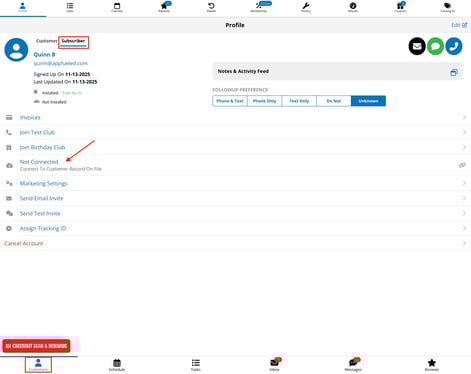
🔍 Step 4: Find the Customer Account
Use Find by Email to locate the correct Customer Account already existing in your SMS.
🔗 Step 5: Associate the Accounts
Select the correct customer record and associate it with the subscriber.
The two profiles are now linked and unified under one customer.