
Watch this 👀**step-by-step guide**
(Video Coming Soon)
---
⚙️ Step 1: Log In to the 2-Way Portal
Access the 2-Way Portal using your login credentials.
🔍 Step 2: Find the Customer
Go to Customers and search for and select the customer you want to update.
🎫 Step 3: Open the Membership Screen
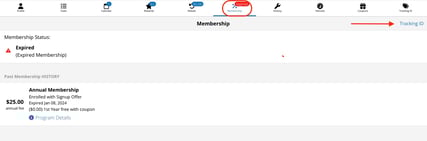
Click Membership in the top banner of the customer’s profile.
🆔 Step 4: Assign the Tracking ID
-
In the top-right corner, click Tracking ID
-
Select Assign ID +
-
Choose Annual Membership
-
Select one of the available tracking codes
🎉 Step 5: Customer Receives Their Free Membership
Once the tracking ID is assigned, the customer will see a coupon for a free annual membership inside their app and can activate it immediately.