
Watch this 👀**step-by-step guide**
(Video Coming Soon)
---
🔧 Step-by-Step: Add More Referral Codes
-
Log into the 2-Way Portal
-
Search for and open the subscriber’s profile
-
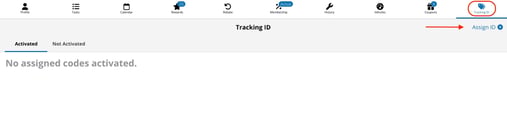
Click Tracking ID at the top
-
Choose Assign ID +
-
Select $ Referral Gift Certificate
-
Choose as many additional referral codes as needed
- Click Assign ID>
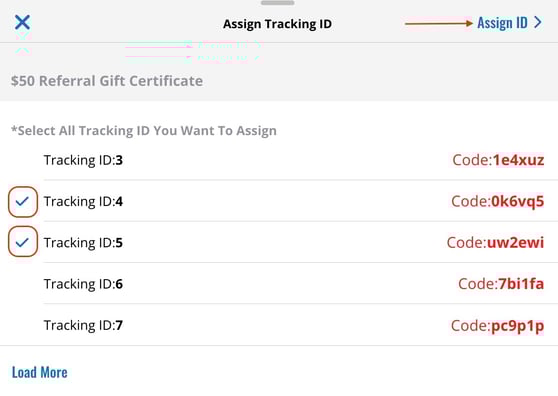
The subscriber will now see the new referral codes inside their app and can continue referring additional customers.
✔️ Summary
-
Subscribers start with 3 referral codes by default
-
You can manually add more at any time
-
This allows high-engagement customers to continue referring beyond the initial limit
🔗 Related Help
If referral codes are not auto-generating to a subscribers profile at all,
👉 Click here to learn more