---
title: How to Adjust Rebate Dollars for a Subscriber
description: How to Adjust Rebate Dollars for a Subscriber account
---
[Skip to content](https://appfueled.com/help/how-to-adjust-rebate-dollars-for-a-subscriber-#main-content)
[More support](https://appfueled.com/help/kb-tickets/new?hsLang=en-us)

Open main navigation
Close main navigation
- [More support](https://appfueled.com/help/kb-tickets/new)
- [Submit Ticket](https://appfueled.com/support)
[Submit Ticket](https://appfueled.com/support?hsLang=en-us)
How can we help you?
- There are no suggestions because the search field is empty.
1. [Help Center](https://appfueled.com/help?hsLang=en-us)
2. [Rebates](https://appfueled.com/help/rebates?hsLang=en-us)
# How to Adjust Rebate Dollars for a Subscriber
## How to Manually Add or Subtract Rebate Dollars from a Subscriber
***Watch this 👀\*\*step-by-step guide\*\****
\---
Follow these quick steps to adjust a subscriber's rebate balance
#### **⚙️ Step 1: Sign In to the Two-Way Portal**
Go to [InstantAutoSite Portal](https://www.instantautosite.net/appfueled/#/login).
Enter your credentials to log in.
💡 **Tip:** Bookmark this page for quick access in the future.
---
#### **🔍 Step 2: Find the Subscriber**
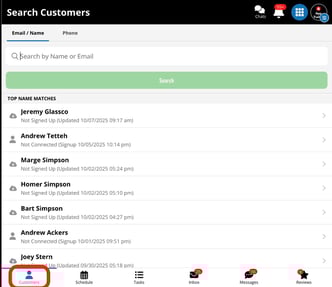
In the search field at the top of the dashboard:
- - Type the subscriber’s **name**, **email**, or **phone number**.
- Select the correct subscriber from the **search results** to open their profile**.**
---
#### **💰 Step 3: Open the Rebates Tab**
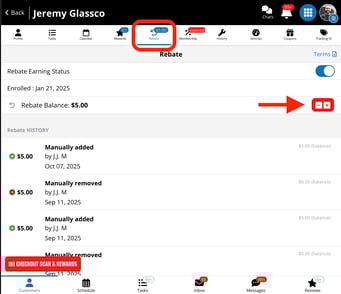
Inside the subscriber’s profile, click the **Rebates** tab.
This section displays the customer’s current rebate balance and adjustment history.
---
#### **➕ Step 4: Adjust the Rebate Balance**
To modify the subscriber’s rebate amount:
1. 1. Use the **+ (add)** or **− (subtract)** buttons.
2. Enter the **dollar amount** you want to add or remove.
3. Click the corresponding button (**+** to add funds, **−** to deduct funds).
4. Confirm the adjustment when prompted.
---
#### **🧾 Step 5: Review and Confirm the Update**
After you confirm, the system automatically records:
1. **Who** made the rebate adjustment
2. **When** the change occurred
3. The **total value** of the adjustment
✅ **Success:** The subscriber’s rebate value has been updated!
- [Staff](https://appfueled.com/help/staff?hsLang=en-us)
- [Reports](https://appfueled.com/help/reports?hsLang=en-us#main-content)
- [Templates/ Automated Texts](https://appfueled.com/help/reports?hsLang=en-us#templates-automated-texts)
- [Call Center](https://appfueled.com/help/call-center?hsLang=en-us#main-content)
- [Admin](https://appfueled.com/help/call-center?hsLang=en-us#admin)
- [Call Center Agent Training](https://appfueled.com/help/call-center?hsLang=en-us#call-center-agent-training)
- [Phone Number](https://appfueled.com/help/call-center?hsLang=en-us#phone-number)
- [Calls Made by Staff/ Service Advisors](https://appfueled.com/help/call-center?hsLang=en-us#calls-made-by-staff-service-advisors)
- [Booking Tool](https://appfueled.com/help/booking-tool?hsLang=en-us#main-content)
- [Scheduling](https://appfueled.com/help/booking-tool?hsLang=en-us#scheduling)
- [Billing](https://appfueled.com/help/billing?hsLang=en-us)
- [Rebates](https://appfueled.com/help/rebates?hsLang=en-us)
- [Reviews](https://appfueled.com/help/reviews?hsLang=en-us)
- [Canned Notes](https://appfueled.com/help/canned-notes?hsLang=en-us)
- [Compliance and Legal](https://appfueled.com/help/compliance-and-legal?hsLang=en-us)
- [Templates/Automated Texts & Emails](https://appfueled.com/help/templates-automated-texts-emails?hsLang=en-us#main-content)
- [Slow Day](https://appfueled.com/help/templates-automated-texts-emails?hsLang=en-us#slow-day)
- [Custom Blast](https://appfueled.com/help/templates-automated-texts-emails?hsLang=en-us#custom-blast)
- [Recommended Customer Journey](https://appfueled.com/help/templates-automated-texts-emails?hsLang=en-us#recommended-customer-journey)
- [Additional CRM Texts/Templates](https://appfueled.com/help/templates-automated-texts-emails?hsLang=en-us#additional-crm-texts-templates)
- [SMS Integration](https://appfueled.com/help/sms-integration?hsLang=en-us)
- [Merge Tags](https://appfueled.com/help/merge-tags?hsLang=en-us)
- [Customer Profile](https://appfueled.com/help/customer-profile?hsLang=en-us)
- [Membership](https://appfueled.com/help/membership?hsLang=en-us)
- [Referral Codes](https://appfueled.com/help/referral-codes?hsLang=en-us)
- [SPAM](https://appfueled.com/help/spam?hsLang=en-us)
- [Sidekick Ninja](https://appfueled.com/help/sidekick-ninja?hsLang=en-us)
- [Coupons](https://appfueled.com/help/coupons?hsLang=en-us)
- [Apple Developer Account](https://appfueled.com/help/apple-developer-account?hsLang=en-us)
- [User Types](https://appfueled.com/help/user-types?hsLang=en-us)
- [Star Rewards](https://appfueled.com/help/star-rewards?hsLang=en-us)
- [App Design](https://appfueled.com/help/app-design?hsLang=en-us)
[](https://appfueled.com/?hsLang=en-us)
#1 app builder platform for auto repair shops since 2015
**Unlike any other CRM, 🚀 launch your first app like a pro!**
[mailto:get@appfueled.com](mailto:get@appfueled.com)
Copyright © 2025 AppFueled™ | All rights reserved.
```json
{
"@context" : "https://schema.org",
"@type" : "VideoObject",
"contentUrl" : "https://stream.mux.com/Z01abHJos01iBUb019v3h8VhqRz4d3F3BbszBr5Z5necao/capped-1080p.mp4",
"dateModified" : "2025-09-11T19:54:02.388Z",
"duration" : "PT1M2.993S",
"height" : 1080,
"name" : "AppFueledTM Login - 11 September 2025",
"thumbnailUrl" : "https://40128452.fs1.hubspotusercontent-na1.net/hubfs/40128452/AppFueledTM%20Login%20-%2011%20September%202025.mp4/medium.jpg",
"uploadDate" : "2025-09-11T19:53:58.997Z",
"width" : 1728
}
```