
---
Follow these quick steps to adjust a subscriber's rebate balance
⚙️ Step 1: Sign In to the Two-Way Portal
Go to InstantAutoSite Portal.
Enter your credentials to log in.
💡 Tip: Bookmark this page for quick access in the future.
🔍 Step 2: Find the Subscriber
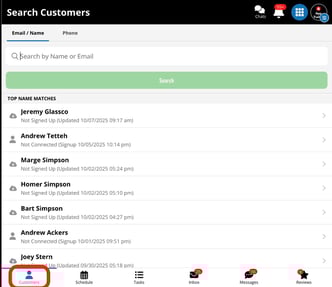
In the search field at the top of the dashboard:
-
-
Type the subscriber’s name, email, or phone number.
-
Select the correct subscriber from the search results to open their profile.
-
💰 Step 3: Open the Rebates Tab
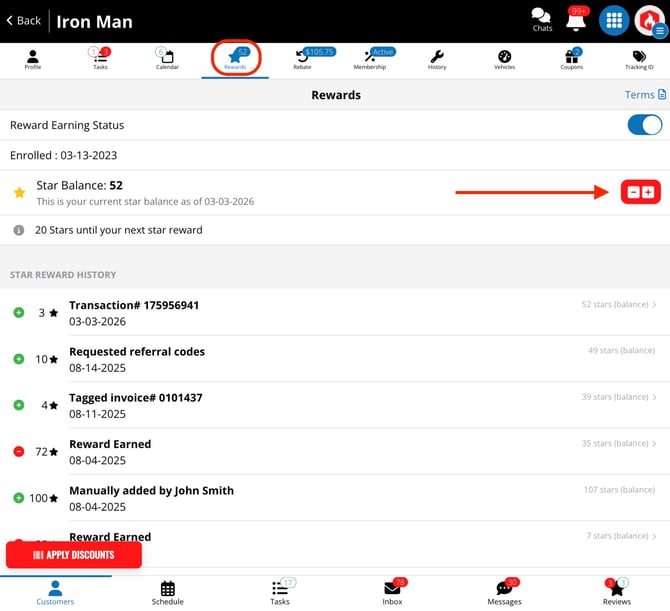
Inside the subscriber’s profile, click the Rewards tab.
This section displays the customer’s current reward balance and adjustment history.
➕ Step 4: Adjust the Star Reward Balance
To modify the subscriber’s rebate amount:
-
-
Use the + (add) or − (subtract) buttons.
-
Enter the star amount you want to add or remove.
-
Click the corresponding button (+ to add funds, − to deduct funds).
-
🧾 Step 5: Review and Confirm the Update
After you confirm, the system automatically records:
-
Who made the rebate adjustment
-
When the change occurred
-
The total value of the adjustment
✅ Success: The subscriber’s reward value has been updated!