---
title: How to Boost Your Shops Google Reviews Using this CRM Template Sequence
description: How to Boost Your Shop’s Google Reviews Using the CRM Template Sequence
---
[Skip to content](https://appfueled.com/help/how-to-boost-your-shops-google-reviews-using-this-crm-template-sequence#main-content)
[More support](https://appfueled.com/help/kb-tickets/new?hsLang=en-us)

Open main navigation
Close main navigation
- [More support](https://appfueled.com/help/kb-tickets/new)
- [Submit Ticket](https://appfueled.com/support)
[Submit Ticket](https://appfueled.com/support?hsLang=en-us)
How can we help you?
- There are no suggestions because the search field is empty.
1. [Help Center](https://appfueled.com/help?hsLang=en-us)
2. [Reviews](https://appfueled.com/help/reviews?hsLang=en-us)
# How to Boost Your Shops Google Reviews Using this CRM Template Sequence
## Google Reviews
***Watch this 👀\*\*step-by-step guide\*\****
\---
Follow these steps to adjust your appointment booking time frames.
MUST HAVE ADMIN PANEL ACCESS TO PROCEED
#### **⚙️ Step 1: Access the Template Settings**
Log in to your **Admin Panel.**
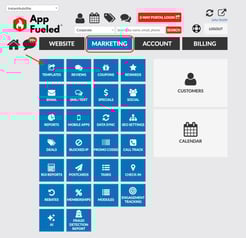
Click **Marketing → Templates → Customers.**
****
**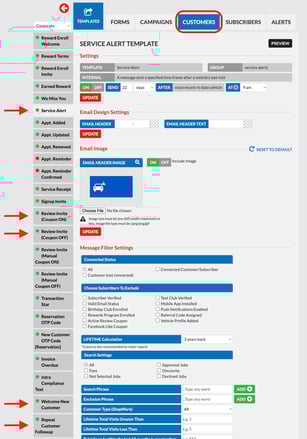**
You’ll see a list of available message templates used for customer communication.
---
#### **🧩 Step 2: Turn On the Five Key Templates**
To set up the **Review Automation Sequence**, toggle on the following five templates and configure their **Send Timing** and **Exclusion Settings** as shown below:
| **Template Name** | **Function** | **Send Timing** | **Don’t Send Template If** |
| --- | --- | --- | --- |
| **Service Receipt** | Automatically sent after a repair order is finalized. | Sent **immediately** after RO is closed. | — |
| **Welcome New Customer** | Sent to new customers to thank them for visiting your shop. | **1 day after** the most recent RO date. | If last received message from customer was **within 1 day.** |
| **Repeat Customer Follow-Up** | Sent to returning customers after their service. | **1 day after** the most recent RO date. | If last received message from customer was **within 1 day.** |
| **Review Invite (Coupon ON)** | Must be turned on for proper system function (this template will not send out). | **2 days after** the most recent RO date. | If last received message from customer was **within 2 days.** |
| **Review Invite (Coupon OFF)** | Sends the message inviting customers to leave a Google review. | **2 days after** the most recent RO date. | If last received message from customer was **within 2 days.** |
**⚠️IMPORTANT:**
If you do not have an app, or if your app has not been built yet, when enabling the **Review Invite (Coupon Off)** template, scroll down to the text message section. Delete the merge tag `${Shop User.Submit Review Email Button}` and replace it with `${write.google_review_url}`
This is required because the original merge tag will not work without an app.
For the new merge tag to work correctly, you must first **input your shortened Google Review URL into AppFueled**.
👉 [**Click here to learn how to add your shortened Google Review URL to AppFueled.**](https://appfueled.com/help/shortened-google-review-url-0?hsLang=en-us)
Once added, the review link will correctly populate in your review invite templates and automations.
---
#### **🔁 Sequence and Timing Explained**
Here’s how this automation naturally generates more Google reviews:
1. **Service Receipt Sent**
- As soon as a repair order is completed, the customer receives a Service Receipt message.
2. **Welcome New Customer and Repeat Customer Follow-Up**
- Both templates are sent **1 day after** the most recent RO date.
- If the customer responds, no further templates are sent (to prevent duplicate outreach).
- If there’s no response, the system automatically sends either the **Welcome New Customer** or **Repeat Customer Follow-Up** template the next day.
3. **Review Invite Trigger**
- If there’s still no reply, the **Review Invite (Coupon ON or OFF)** template is sent **2 days after** the most recent RO date.
- This message includes a direct link to your shop’s Google review page — making it quick and easy for the customer to leave feedback.
4. **Smart Protection**
- If a customer replies at any point, all later templates stop automatically.
- This ensures your shop doesn’t send multiple or unnecessary messages.
✨ **Why this boosts reviews:**
This sequence reaches customers when they’re most satisfied — right after service. Automating the process ensures consistency, saves time, and increases your total review volume.
---
#### **📱 Step 3: Set Correct Follow-Up Preferences**
For each of the five templates:
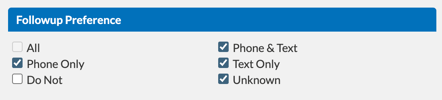
1. Go to the **Follow-Up Preferences** section.
2. Set the preferences to include:
- **Phone and Text**
- **Text Only**
- **Unknown**
- **Phone Only**
3. Click **Update**
These preferences ensure that messages are delivered in the customer’s preferred communication method — improving engagement and review response rates.
---
#### **💬 Optional: Send a Canned Message When a Customer Responds**
If a customer replies positively, you can send a preloaded **thank-you** or **review follow-up** message for a personal touch.
To send a canned message in the 2-way portal:
1. Click the **Notes Icon** on the left side of the customer’s message.
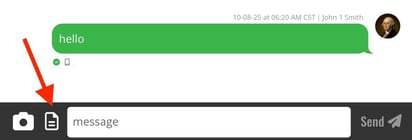
2. Scroll to find your desired preloaded message.
3. Send it directly from the customer’s **CRM profile.**
🔗 **Need help adding Canned Notes to Messages?** [Click here for a guide!](https://appfueled.com/help/how-to-create-new-canned-notes-for-text/-email-scripts-?hsLang=en-us)
This friendly, personalized follow-up reinforces the customer’s great experience and often leads to a genuine Google review.
- [Staff](https://appfueled.com/help/staff?hsLang=en-us)
- [Reports](https://appfueled.com/help/reports?hsLang=en-us#main-content)
- [Templates/ Automated Texts](https://appfueled.com/help/reports?hsLang=en-us#templates-automated-texts)
- [Call Center](https://appfueled.com/help/call-center?hsLang=en-us#main-content)
- [Admin](https://appfueled.com/help/call-center?hsLang=en-us#admin)
- [Call Center Agent Training](https://appfueled.com/help/call-center?hsLang=en-us#call-center-agent-training)
- [Phone Number](https://appfueled.com/help/call-center?hsLang=en-us#phone-number)
- [Calls Made by Staff/ Service Advisors](https://appfueled.com/help/call-center?hsLang=en-us#calls-made-by-staff-service-advisors)
- [Booking Tool](https://appfueled.com/help/booking-tool?hsLang=en-us#main-content)
- [Scheduling](https://appfueled.com/help/booking-tool?hsLang=en-us#scheduling)
- [Billing](https://appfueled.com/help/billing?hsLang=en-us)
- [Rebates](https://appfueled.com/help/rebates?hsLang=en-us)
- [Reviews](https://appfueled.com/help/reviews?hsLang=en-us)
- [Canned Notes](https://appfueled.com/help/canned-notes?hsLang=en-us)
- [Compliance and Legal](https://appfueled.com/help/compliance-and-legal?hsLang=en-us)
- [Templates/Automated Texts & Emails](https://appfueled.com/help/templates-automated-texts-emails?hsLang=en-us#main-content)
- [Slow Day](https://appfueled.com/help/templates-automated-texts-emails?hsLang=en-us#slow-day)
- [Custom Blast](https://appfueled.com/help/templates-automated-texts-emails?hsLang=en-us#custom-blast)
- [Recommended Customer Journey](https://appfueled.com/help/templates-automated-texts-emails?hsLang=en-us#recommended-customer-journey)
- [Additional CRM Texts/Templates](https://appfueled.com/help/templates-automated-texts-emails?hsLang=en-us#additional-crm-texts-templates)
- [SMS Integration](https://appfueled.com/help/sms-integration?hsLang=en-us)
- [Merge Tags](https://appfueled.com/help/merge-tags?hsLang=en-us)
- [Customer Profile](https://appfueled.com/help/customer-profile?hsLang=en-us)
- [Membership](https://appfueled.com/help/membership?hsLang=en-us)
- [Referral Codes](https://appfueled.com/help/referral-codes?hsLang=en-us)
- [SPAM](https://appfueled.com/help/spam?hsLang=en-us)
- [Sidekick Ninja](https://appfueled.com/help/sidekick-ninja?hsLang=en-us)
- [Coupons](https://appfueled.com/help/coupons?hsLang=en-us)
- [Apple Developer Account](https://appfueled.com/help/apple-developer-account?hsLang=en-us)
- [User Types](https://appfueled.com/help/user-types?hsLang=en-us)
- [Star Rewards](https://appfueled.com/help/star-rewards?hsLang=en-us)
- [App Design](https://appfueled.com/help/app-design?hsLang=en-us)
[](https://appfueled.com/?hsLang=en-us)
#1 app builder platform for auto repair shops since 2015
**Unlike any other CRM, 🚀 launch your first app like a pro!**
[mailto:get@appfueled.com](mailto:get@appfueled.com)
Copyright © 2025 AppFueled™ | All rights reserved.
```json
{
"@context" : "https://schema.org",
"@type" : "VideoObject",
"contentUrl" : "https://stream.mux.com/qeLZhSrVLojONo5Zrg9tFpMmxqmyHOTllJfWc3bNsW8/capped-1080p.mp4",
"dateModified" : "2025-10-07T18:29:18.493Z",
"duration" : "PT3M0.049S",
"height" : 1080,
"name" : "Boost Your Shops Google Reviews with This CRM Template Sequence",
"thumbnailUrl" : "https://40128452.fs1.hubspotusercontent-na1.net/hubfs/40128452/Boost%20Your%20Shops%20Google%20Reviews%20with%20This%20CRM%20Template%20Sequence.mp4/medium.jpg",
"uploadDate" : "2025-10-07T18:29:10.917Z",
"width" : 1920
}
```