
Watch this 👀**step-by-step guide**
Video coming soon!
---
MUST HAVE ADMIN ACCESS TO PROCEED
⚙️ Step 1: Enable Global Anti-Spam Settings
-
Log in to the Admin Panel
-
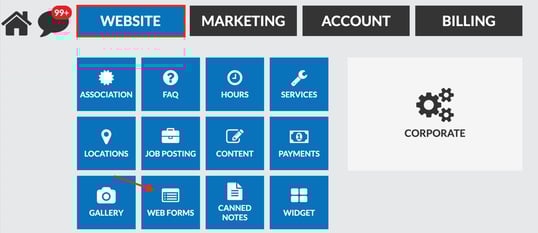
Go to Website → Webforms
-
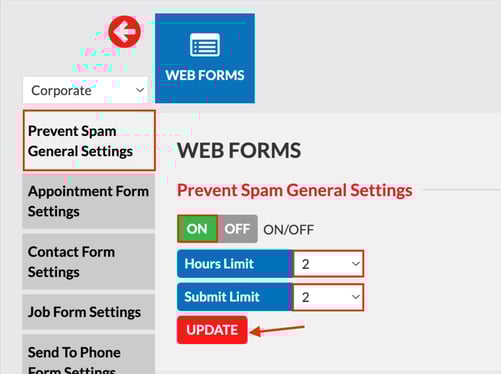
Click Prevent Spam (General Settings)
-
Toggle Prevent Spam General Settings→ ON
-
Set both:
-
Hours Limit (how often the same user/IP can submit)
-
Submit Limit (maximum number of submissions allowed)
- E.g. If you have 2 hours limit, and 2 hour submit, this is allowing a maximum of 2 submissions in a 2 hour span (per IP)
-
- Click Update
-
This adds platform-wide protection to all forms.
🧩 Step 2: Enable Spam Protection on the Specific Form
-
Scroll to the specific form that is receiving spam
- Toggle Captcha → ON
- select Google or other
-
Toggle Prevent Spam → ON
-
Set both:
-
Hours Limit
-
Submit Limit
-
-
-
Click Update
These settings help block repeated submissions from bots or suspicious users.
🔗 Related Help
To learn how to block the IP address and domains of spammers, click here!