
🧭 Step 1: Open the Message Thread
Navigate to the customer’s message thread.
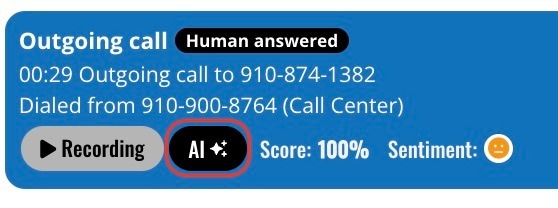
🤖 Step 2: Click the AI Button
Click the AI button within the call report bubble.
📤 Step 3: Forward the Shop Handoff
-
Click the Forward button

-
Choose how you want to send the handoff:
-
Text Message
-
Email Message
-
⚙️ Step 4: Set Handoff Details
Before sending, select:
-
The priority level of the handoff
-
The staff member the handoff should be assigned to
✅ Step 5: Send
Click Send to deliver the shop handoff.
🎉 Result
The shop handoff is successfully sent and assigned, ensuring the right team member can follow up promptly.