---
title: How to Update Available Appointment Booking Hours
description: Learn how to easily adjust your appointment booking hours in the admin panel. This step-by-step guide shows you how to set business hours, add breaks, close weekends, and update availability in just a few clicks.
---
[Skip to content](https://appfueled.com/help/how-to-update-available-appointment-booking-hours#main-content)
[More support](https://appfueled.com/help/kb-tickets/new?hsLang=en-us)

Open main navigation
Close main navigation
- [More support](https://appfueled.com/help/kb-tickets/new)
- [Submit Ticket](https://appfueled.com/support)
[Submit Ticket](https://appfueled.com/support?hsLang=en-us)
How can we help you?
- There are no suggestions because the search field is empty.
1. [Help Center](https://appfueled.com/help?hsLang=en-us)
2. [Booking Tool](https://appfueled.com/help/booking-tool?hsLang=en-us)
3. [Scheduling](https://appfueled.com/help/booking-tool?hsLang=en-us#scheduling)
# How to Update Available Appointment Booking Hours
## Available Appointment Booking Times
***Watch this 👀\*\*step-by-step guide\*\****
\---
Follow these steps to adjust your appointment booking time frames.
MUST HAVE ADMIN PANEL ACCESS TO PROCEED
#### **⚙️ Step 1: Log In to the Admin Panel**
Go to [InstantAutoSite Admin Panel](https://www.instantautosite.net/login).
Enter your credentials to access your dashboard.
💡 **Tip:** Be sure you’re logged into the correct shop location before making schedule changes.
---
#### **🕓 Step 2: Navigate to Appointment Hours**
From the top banner:
1. Click **Website**.
2. From the dropdown menu, select **Hours**.
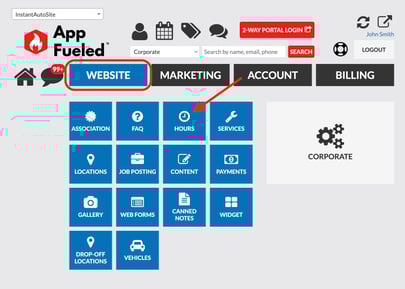
This section controls your shop’s **appointment and availability schedule**.
---
#### **🗓️ Step 3: Set Your Appointment Hours**
- Adjust your **store hours** for each day.
- Modify your **available appointment hours** to match when you accept bookings.
- You can split appointment hours to include breaks or special time blocks.
💡 **Example:**
If your shop closes for lunch from 1:00 PM to 2:00 PM, stop appointment availability at **1:00 PM** and resume again at **2:00 PM**.
---
#### **🚪 Step 4: Customize Closures**
If your business is closed on certain days (like weekends or holidays):
- Simply check the **Closed** box next to those days.
This prevents customers from booking appointments when your shop isn’t open.
---
#### **💾 Step 5: Save Your Changes**
Once all adjustments are complete:
- Click **Update** to save your new settings.

✅ **Success:** Your updated appointment hours are now active and visible to customers!
- [Staff](https://appfueled.com/help/staff?hsLang=en-us)
- [Reports](https://appfueled.com/help/reports?hsLang=en-us#main-content)
- [Templates/ Automated Texts](https://appfueled.com/help/reports?hsLang=en-us#templates-automated-texts)
- [Call Center](https://appfueled.com/help/call-center?hsLang=en-us#main-content)
- [Admin](https://appfueled.com/help/call-center?hsLang=en-us#admin)
- [Call Center Agent Training](https://appfueled.com/help/call-center?hsLang=en-us#call-center-agent-training)
- [Phone Number](https://appfueled.com/help/call-center?hsLang=en-us#phone-number)
- [Calls Made by Staff/ Service Advisors](https://appfueled.com/help/call-center?hsLang=en-us#calls-made-by-staff-service-advisors)
- [Booking Tool](https://appfueled.com/help/booking-tool?hsLang=en-us#main-content)
- [Scheduling](https://appfueled.com/help/booking-tool?hsLang=en-us#scheduling)
- [Billing](https://appfueled.com/help/billing?hsLang=en-us)
- [Rebates](https://appfueled.com/help/rebates?hsLang=en-us)
- [Reviews](https://appfueled.com/help/reviews?hsLang=en-us)
- [Canned Notes](https://appfueled.com/help/canned-notes?hsLang=en-us)
- [Compliance and Legal](https://appfueled.com/help/compliance-and-legal?hsLang=en-us)
- [Templates/Automated Texts & Emails](https://appfueled.com/help/templates-automated-texts-emails?hsLang=en-us#main-content)
- [Slow Day](https://appfueled.com/help/templates-automated-texts-emails?hsLang=en-us#slow-day)
- [Custom Blast](https://appfueled.com/help/templates-automated-texts-emails?hsLang=en-us#custom-blast)
- [Recommended Customer Journey](https://appfueled.com/help/templates-automated-texts-emails?hsLang=en-us#recommended-customer-journey)
- [Additional CRM Texts/Templates](https://appfueled.com/help/templates-automated-texts-emails?hsLang=en-us#additional-crm-texts-templates)
- [SMS Integration](https://appfueled.com/help/sms-integration?hsLang=en-us)
- [Merge Tags](https://appfueled.com/help/merge-tags?hsLang=en-us)
- [Customer Profile](https://appfueled.com/help/customer-profile?hsLang=en-us)
- [Membership](https://appfueled.com/help/membership?hsLang=en-us)
- [Referral Codes](https://appfueled.com/help/referral-codes?hsLang=en-us)
- [SPAM](https://appfueled.com/help/spam?hsLang=en-us)
- [Sidekick Ninja](https://appfueled.com/help/sidekick-ninja?hsLang=en-us)
- [Coupons](https://appfueled.com/help/coupons?hsLang=en-us)
- [Apple Developer Account](https://appfueled.com/help/apple-developer-account?hsLang=en-us)
- [User Types](https://appfueled.com/help/user-types?hsLang=en-us)
- [Star Rewards](https://appfueled.com/help/star-rewards?hsLang=en-us)
- [App Design](https://appfueled.com/help/app-design?hsLang=en-us)
[](https://appfueled.com/?hsLang=en-us)
#1 app builder platform for auto repair shops since 2015
**Unlike any other CRM, 🚀 launch your first app like a pro!**
[mailto:get@appfueled.com](mailto:get@appfueled.com)
Copyright © 2025 AppFueled™ | All rights reserved.
```json
{
"@context" : "https://schema.org",
"@type" : "VideoObject",
"contentUrl" : "https://stream.mux.com/apmyWJPbOnsqIkU3ca4IMJr5Put7np1v6ja3biu1yoM/capped-1080p.mp4",
"dateModified" : "2025-09-30T17:33:38.191Z",
"duration" : "PT51.029S",
"height" : 1080,
"name" : "How to Update Appointment Booking Hours",
"thumbnailUrl" : "https://40128452.fs1.hubspotusercontent-na1.net/hubfs/40128452/How%20to%20Update%20Appointment%20Booking%20Hours.mp4/medium.jpg",
"uploadDate" : "2025-09-30T17:33:34.694Z",
"width" : 1920
}
```