
Watch this 👀**step-by-step guide**
(Video coming soon)
---
MUST HAVE ADMIN PANEL ACCESS TO PROCEED
⚙️ Step 1: Log In to the Admin Panel
Go to InstantAutoSite Admin Panel.
Enter your credentials to access your dashboard.
💡 Tip: Be sure you’re logged into the correct shop location before making schedule changes.
🧩 Step 2: Navigate to Service Tags
Go to:
Website → Services
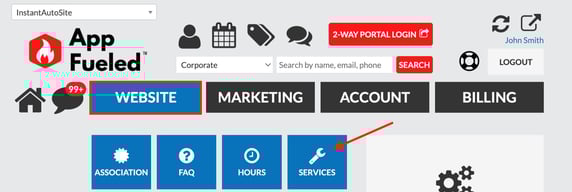
Service Tags → All
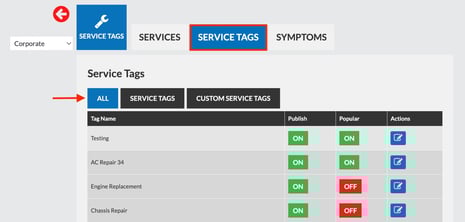
*If a multi- location account make sure you are in the right location, adjustments will have to be made for each location
🔄 Step 3: Reorder Your Services
From the list of services:
-
Click and drag each service
-
Arrange them in the order you want customers to see on the booking tool
The order shown here is the order reflected in the booking experience.
✅ Result
Your booking tool will now display services based on the updated priority order, making it easier for customers to find your most important or commonly booked services.