
Watch this 👀**step-by-step guide**
(Video Coming Soon)
---
MUST HAVE ADMIN PANEL ACCESS TO PROCEED
⚙️ Step 1: Log In to the Admin Panel
Go to InstantAutoSite Admin Panel.
Enter your credentials to access your account
🧭 Step 2: Navigate to Customer Report
-
Go to Marketing → Customers
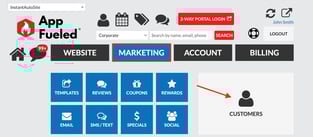
-
Click Download Customer/Subscriber List
This will generate a file containing your customer and subscriber data.
📁 Step 2: Download and Save the File
Once downloaded, save the file to your computer.
The file will include customer details such as membership enrollment, rewards, membership expiration dates, email, name etc.
🤖 Want to Identify Your Active Members?
If you’d like to use this file to create a list of active members only,
👉 click here to learn how to use AI to identify active members from your exported file.